

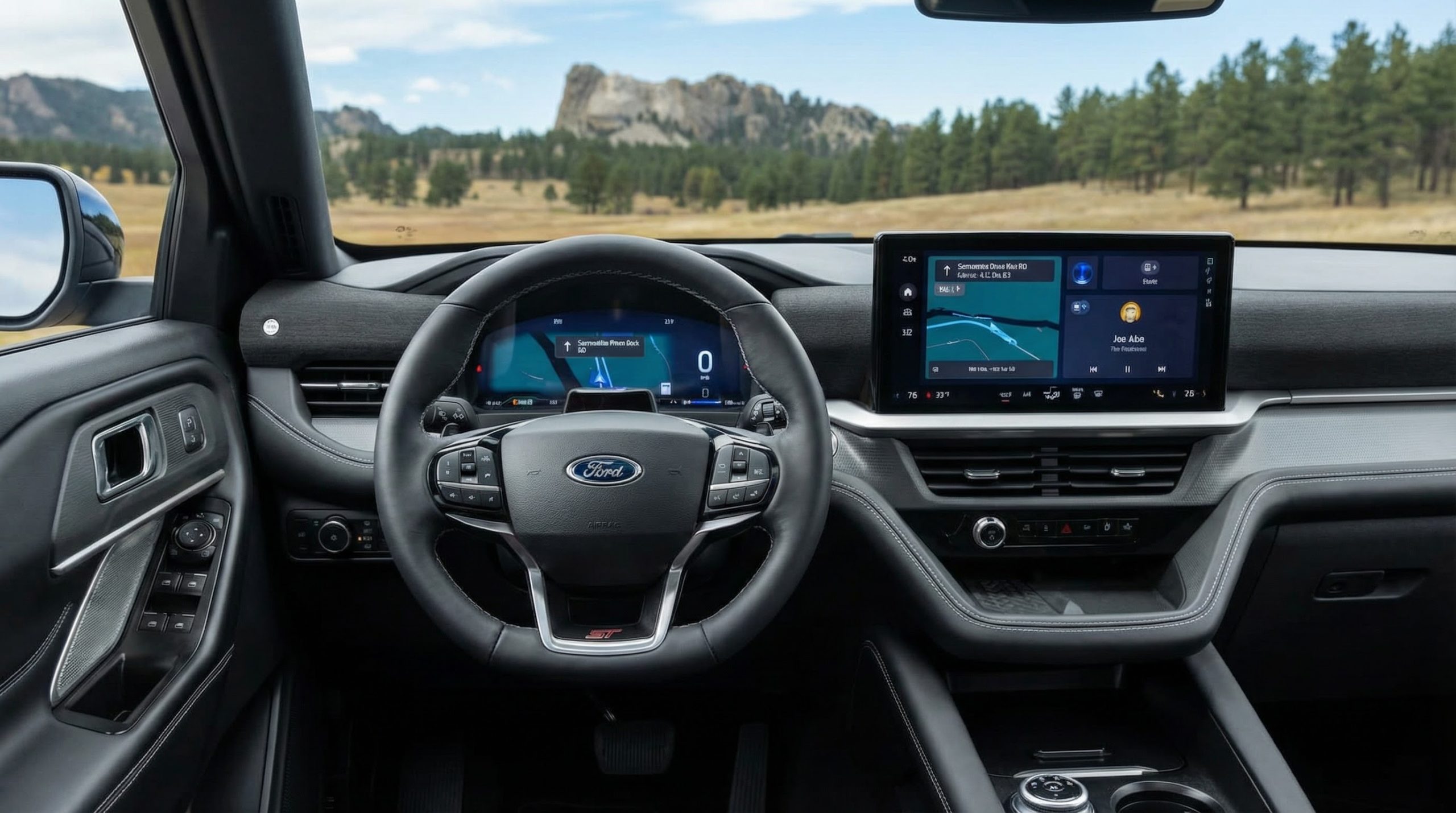
2026 Ford Explorer Technology & Safety Features Explained
The 2026 Ford Explorer offers modern technology designed to make driving easier, safer, and more connected. But many of the feature names — like BlueCruise, digital clusters, connectivity packages, and driver-assist systems — can feel confusing if you’re not familiar with Ford terminology.
This guide explains what the technology actually does in plain language, how it works in everyday life, and what you should pay attention to when choosing a trim.
For a full breakdown of how technology fits into the overall trim structure, see the complete 2026 Ford Explorer overview.
Table of Contents
- What is the 13.2-inch touchscreen?
- What is a digital instrument cluster?
- What is Ford BlueCruise?
- What driver-assist features are available?
- What is Ford connectivity?
- Do you have to pay for subscriptions?
- Which trim has the most technology?
- How to choose the right tech setup
What is the 13.2-inch touchscreen in the 2026 Explorer?
The 13.2-inch touchscreen is the main control center in the middle of the dashboard. It replaces many physical buttons and allows you to control navigation, music, phone calls, climate settings, and vehicle settings through a large display.
Think of it like a large tablet built into your vehicle. It responds to touch and allows menu navigation similar to a smartphone.
Apple CarPlay and Android Auto allow you to mirror your phone onto the screen so you can use familiar apps like maps and music.
What is a digital instrument cluster?
The digital instrument cluster is the screen directly in front of the driver. Instead of traditional analog gauges, it shows speed, fuel level, navigation prompts, and safety alerts on a customizable display.
This means the information can change depending on what you’re doing. For example, when using navigation, directions may appear directly in your line of sight.
What is Ford BlueCruise and how does it work?
BlueCruise is Ford’s hands-free highway driving system.
On certain pre-mapped highways, BlueCruise can allow the driver to remove their hands from the steering wheel while the vehicle maintains lane position and speed.
Important points:
- The driver must still pay attention to the road.
- The system uses cameras and sensors to monitor driver awareness.
- It works only on approved highways.
- Availability depends on trim and equipment selection.
BlueCruise does not replace the driver. It assists during long highway stretches to reduce fatigue.
What driver-assist features are available?
Driver-assist features are systems that help prevent accidents or reduce driver workload. These may include:
- Lane Keeping Assist – Gently helps keep the vehicle centered in its lane.
- Adaptive Cruise Control – Automatically adjusts speed to maintain distance from the vehicle ahead.
- Blind Spot Monitoring – Alerts you if a vehicle is in your blind spot.
- Pre-Collision Assist – Can warn you of potential frontal collisions.
- Rear Cross-Traffic Alert – Detects vehicles approaching from the side when backing out.
These systems support safer driving but do not replace driver responsibility.
What is Ford connectivity?
Connectivity refers to the Explorer’s ability to connect to the internet and communicate with your smartphone.
This enables features like:
- Remote start from your phone
- Vehicle location tracking
- Software updates over Wi-Fi
- Connected navigation services
Some features may require activation or subscription after an initial trial period.
Do you have to pay for subscriptions?
Some connected features and BlueCruise functionality may require a subscription after a trial period, depending on configuration.
It’s important to confirm what is included with your specific vehicle and how long any complimentary service lasts.
Which 2026 Explorer trim has the most technology?
Platinum and ST trims typically include the most advanced technology availability, though final feature inclusion depends on equipment group selection.
Trim comparison is explained further in our Explorer Trim Levels Guide.
How do you choose the right technology setup?
- Decide whether hands-free highway driving matters to you.
- Consider how often you use smartphone navigation.
- Determine whether remote access features are important.
- Review trim-level availability carefully.
- Confirm subscription details before purchase.
Key Takeaways
- The 13.2-inch screen functions like a large built-in tablet.
- The digital cluster replaces traditional gauges.
- BlueCruise allows hands-free highway driving in approved areas.
- Driver-assist systems help reduce risk but do not replace drivers.
- Some connected services may require subscriptions.
Frequently Asked Questions
Does the 2026 Explorer drive itself?
No. BlueCruise assists on certain highways, but the driver must remain attentive and responsible at all times.
Is BlueCruise standard?
BlueCruise availability depends on trim and equipment group selection.
Can I use Apple CarPlay without a subscription?
Apple CarPlay and Android Auto functionality do not require a subscription.
Does the Explorer update its software automatically?
Some vehicles can receive over-the-air software updates when connected to Wi-Fi.
Conclusion
In my experience, Explorer technology feels overwhelming at first because of the terminology — but once it’s broken down into what each system actually does in daily life, it becomes much easier to decide what matters. Most families don’t need every feature; they just need the right combination for how they drive.
About the Author
Lexy Tabbert provides research-driven SUV configuration guidance for drivers throughout South Dakota and beyond.

